Text tools · Free
SEO Text Analyzer and Uniqueness Check
A free online tool for editors and SEO specialists. Paste a text or HTML code, add your keywords and get a score with an explanation of what lowers the quality. The main checks run in your browser.
Paste a text and the analysis will appear here.
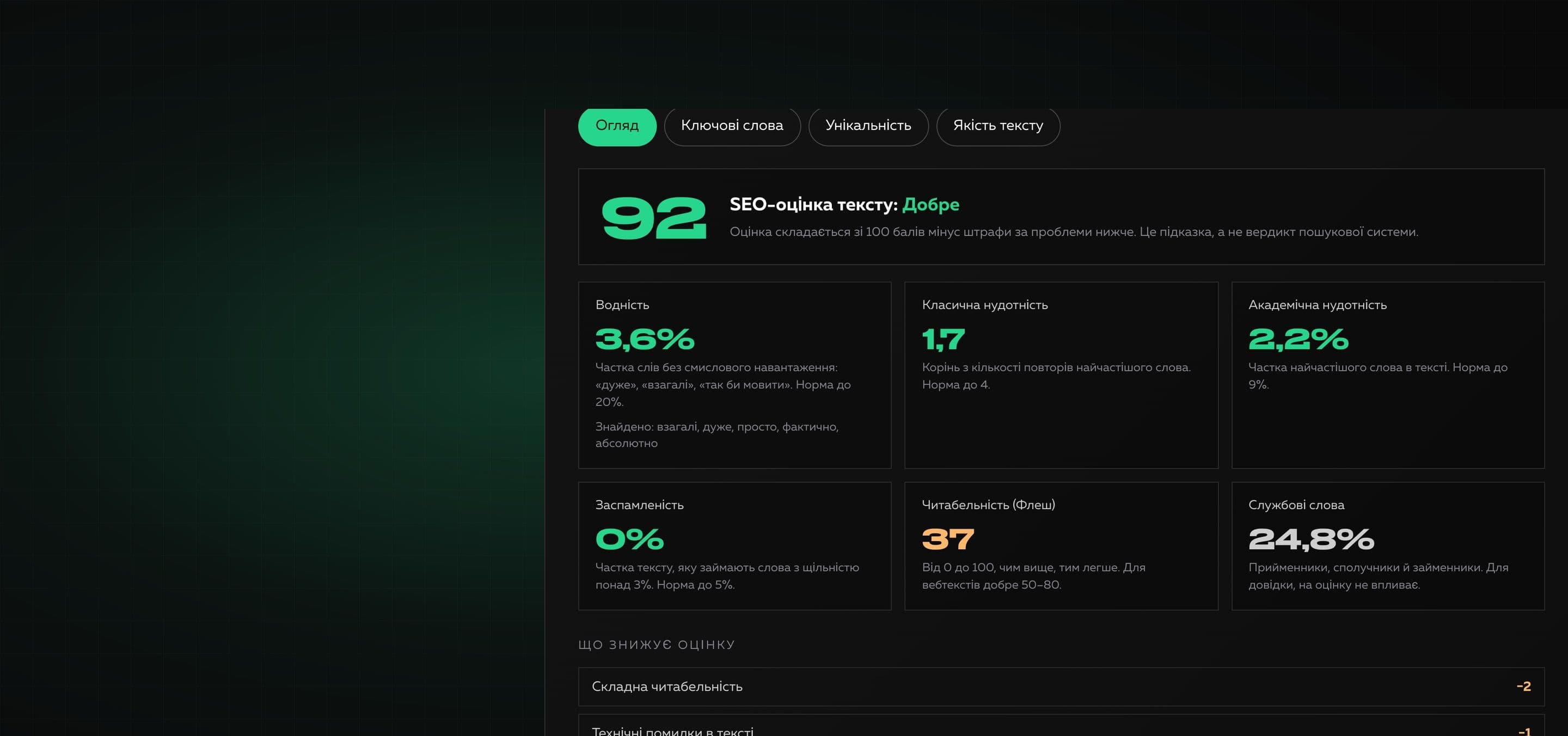
Before publishing, an article should be meaningful, not stuffed with keywords, easy to read and unique. The tool calculates the indicators familiar from text.ru: water, classic and academic nausea, keyword stuffing, as well as a readability index, the most frequent words and phrases and the share of your keywords. Every formula is described on the page, and the score breaks down into penalties, so it can be checked.
Uniqueness is checked honestly. Always available are comparison with your own texts (a competitor, a source, an earlier article) with highlighted matches, and a search for repeats inside the text. When a search API key is set on the server, a sample check on the web is added: up to six fragments are searched as exact phrases. It is not a full database like Copyscape or Content-Watch, and we say so plainly.
Why it is useful
- 01
SEO indicators like text.ru
Water, classic and academic nausea, keyword stuffing, Flesch readability, the most frequent words and phrases, the density of your keywords. For Ukrainian, Russian and English.
- 02
A score you can explain
The overall score is 100 points minus penalties, and every penalty is shown: from keyword stuffing to long sentences and technical mistakes.
- 03
Comparison with other texts
Add up to five texts to compare with. Matches are searched in groups of words with word endings taken into account, and your text is highlighted where a match is found.
- 04
Repeats inside the text
Finds repeated sentences and passages and shows what share of the text they take.
- 05
An honest web check
A sample check of fragments through a search API is switched on separately, only with your consent, and is clearly marked as a sample.
How to use it
- 01
Paste the text
Paste a text or HTML code, or open a .txt or .html file. Add keywords separated by commas if needed.
- 02
Review the analysis
The overview shows the score and indicators, and the tabs show keywords, uniqueness and text quality.
- 03
Check uniqueness
Add texts to compare with, look at the repeats and, if needed, run a sample check on the web.
Where it helps
An editor before publishing
Check an article for water, stuffing and difficulty before readers see it.
An SEO specialist and a copywriter
Verify keyword density and make sure the keywords appear near the start of the text.
Checking a text from a contractor
Compare the article with the sources and look for obvious copies on the web.
Updating old articles
Compare the new version with the old one to see what changed and to find self-repeats.
Product and category descriptions
Check that template descriptions do not repeat each other.
How we built it
Read on the blog
Frequently asked questions
Is the tool free?
Yes. You can use it without payment and without signing up.
Is my text sent to a server?
The analysis, the comparison with your texts and the search for repeats run in your browser, and the text is sent nowhere. Only the web check sends up to six short fragments to a search engine through our server. It is switched on separately, needs your consent, and we do not store the fragments.
How is this different from Copyscape or Content-Watch?
They have their own indexes of the internet and check the whole text. Our tool compares the text with what you paste, looks for repeats and, if a search API is connected, checks up to six fragments as a sample. That finds obvious copies but does not guarantee that there are no matches anywhere.
How are water, nausea and keyword stuffing calculated?
Water: the share of words and phrases with no meaning (“very”, “basically”, “kind of”). Classic nausea: the square root of the count of the most frequent word. Academic nausea: the share of that word in the text. Keyword stuffing: the share of the text taken by words with a density over 3%. These are transparent formulas, not a standard of search engines.
Which languages are supported?
Ukrainian, Russian and English: they have lists of service words and a simple stemmer that joins word forms. Texts in other languages are analyzed by English rules.
Does the tool check spelling?
No, that needs a dictionary of the language. It does find technical mistakes: double spaces, spaces before punctuation, repeated words, Latin letters inside Cyrillic words and mixed quotes.
What are the limits?
Up to 500,000 characters of text, a file up to 2 MB, up to five texts to compare with. The web check takes up to six fragments and is allowed no more than eight times in ten minutes.
Need your own tool for your team?
We build useful online tools and internal services: from idea and design to launch. Tell us what routine is worth removing.